
 Join our Discord
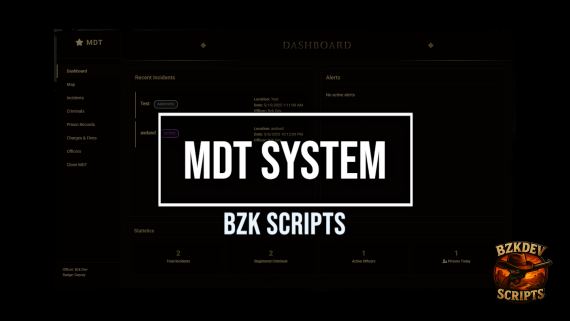
# 🚔 BZK MDT - Mobile Data Terminal

## 📋 Overview
**BZK MDT** is a complete Mobile Data Terminal system developed specifically for **RedM** servers using **VORP** and **RSG** frameworks. This system provides a modern and functional interface for law enforcement officers to manage incidents, criminals, fines, arrests, and much more.
### ✨ Key Features
- 🎨 **Modern Interface**: Responsive and elegant western-style design
- 🔧 **Multi-Framework**: Full support for VORP and RSG
- 🗃️ **Complete System**: Criminal, fine, arrest, and evidence management
- 📸 **Photo Evidence**: Image upload system for cases
- 🗺️ **Integrated Map**: Location and incident visualization
- 🔐 **Permission System**: Job-based access control
- 📊 **Statistical Dashboard**: Real-time overview
- 🔗 **Discord Integration**: Webhooks for logs and notifications
---
## 🚀 Installation
### 1. Required Dependencies
- **Framework**: VORP Core or RSG Core
- **Database**: oxmysql
- **RedM Build**: Updated
### 2. Resource Installation
1. Download the resource and extract to `resources/[standalone]/` folder
2. Import the `mdt.sql` file into your database
3. Add `ensure bzk_mdt` to your `server.cfg`
4. Configure the `config.lua` file as needed
### 3. Configuration
Edit the `config.lua` file:
```lua
Config.Framework = 'VORP' -- or 'RSG'
Config.Command = 'mdt'
Config.AllowedJobs = {
'vallaw',
'police',
'sheriff',
'marshal'
}
```
---
## 📱 System Pages
### 🏠 **Dashboard**
- **Functionality**: Home page with system overview
- **Features**:
- Real-time alerts
- Recent incidents
- General statistics (criminals, officers, arrests)
- Logged officer status
- **Access**: All authorized officers
### 🗺️ **Map**
- **Functionality**: Geographic visualization of incidents and locations
- **Features**:
- Interactive region map
- Incident markers
- Police station locations
- **Access**: Officers with map permission
### 📋 **Incidents**
- **Functionality**: Police occurrence management
- **Features**:
- New incident registration
- Active case viewing
- Occurrence history
- Evidence attachment
- **Access**: All officers
### 👤 **Criminals**
- **Functionality**: Criminal database
- **Features**:
- New criminal registration
- Search by name or identity
- Complete criminal history
- Current status (wanted, arrested, released)
- Add charges/accusations
- **Access**: Authorized officers
### 🏛️ **Arrests**
- **Functionality**: Prison system management
- **Features**:
- Arrest registration
- Sentence time
- Arrest reasons
- Detention history
- Current prisoner status
- **Access**: Officers with arrest permission
### 💰 **Fines & Charges**
- **Functionality**: Fine and penalty system
- **Features**:
- Fine application
- Predefined charge types
- Configurable values
- Payment history
- Discount system
- **Access**: Authorized officers
### 📸 **Photo Evidence**
- **Functionality**: Visual evidence system
- **Features**:
- Photo upload
- Evidence categorization
- Link to specific cases
- Image gallery
- **Access**: All officers
### 👮♂️ **Officers**
- **Functionality**: Police personnel management
- **Features**:
- Officer profiles
- Individual statistics
- Activity history
- Service status
- **Access**: Supervisors and administrators
---
## 🎮 System Commands
### 🖥️ `/mdt`
- **Function**: Opens the MDT terminal
- **Usage**: `/mdt`
- **Permission**: Authorized officers
- **Example**:
```
/mdt
```
- **Description**: Main command to access the entire MDT system. Automatically checks if the player has authorized job.
### 💸 `/payfine`
- **Function**: Opens the fine payment system
- **Usage**: `/payfine`
- **Permission**: All players
- **Example**:
```
/payfine
```
- **Description**:
- Opens your own fines
- Automatic discount system available
- Direct payment via framework money
### ⏰ `/prisontime`
- **Function**: Check remaining prison time
- **Usage**: `/prisontime`
- **Permission**: All players
- **Example**:
```
/prisontime
```
- **Description**:
- Shows your own prison time
- Displays remaining time in readable format
- Information about arrest reason
---
## ⚙️ Advanced Settings
### 🔐 Permission System
```lua
Config.Permissions = {
dashboard = {'vallaw','police', 'sheriff', 'marshal'},
map = {'vallaw','police', 'sheriff', 'marshal'},
evidences = {'vallaw','police', 'sheriff', 'marshal'},
criminals = {'vallaw','police', 'sheriff', 'marshal'},
prisons = {'vallaw','police', 'sheriff', 'marshal'},
fines = {'vallaw','police', 'sheriff', 'marshal'},
officers = {'vallaw','police', 'sheriff', 'marshal'},
arrest = {'vallaw','police', 'sheriff', 'marshal'}
}
```
### 🎣 Discord Webhooks
```lua
Config.Webhooks = {
mdt = "your_webhook_here",
log = "your_log_webhook_here"
}
```
### 🗄️ Database Configuration
```lua
Config.Database = {
criminals = 'mdt_criminals',
criminal_charges = 'mdt_criminal_charges',
prison_records = 'mdt_prison_records',
fine_types = 'mdt_fine_types',
officer_profiles = 'mdt_officer_profiles',
officer_stats = 'mdt_officer_stats',
photo_evidences = 'mdt_photo_evidences',
evidence = 'mdt_evidence'
}
```
---
## 🛠️ File Structure
```
bzk_mdt/
├── 📁 client/
│ └── client.lua # Client-side scripts
├── 📁 server/
│ └── server.lua # Server-side scripts
├── 📁 html/
│ ├── index.html # Main interface
│ ├── script.js # Main JavaScript
│ ├── style.css # General styles
│ ├── 📁 css/ # Specific styles
│ ├── 📁 js/ # JavaScript scripts
│ └── 📁 img/ # Images and icons
├── config.lua # Main configuration
├── fxmanifest.lua # Resource manifest
├── mdt.sql # Database structure
├── README.md # Portuguese documentation
└── README_EN.md # This documentation
```
---
## 🎯 How to Use
### For Officers:
1. **System Access**: Use `/mdt` to open the terminal
2. **Navigation**: Use the sidebar menu to switch between pages
3. **Criminal Registration**: Go to "Criminals" → "Register Criminal"
4. **Apply Fines**: Select a criminal → "Add Charge"
5. **Record Arrests**: Use the "Arrests" page to document detentions
6. **Evidence**: Upload photos on the "Photo Evidence" page
### For Players:
1. **View Fines**: Use `/payfine` to see your pending fines
2. **Pay Fines**: Select fines and click "Pay Selected"
3. **Prison Time**: Use `/prisontime` to check your situation
4. **Discount**: Fines may have automatic time-based discount
---
## 🆘 Support and Issues
### Common Problems:
**❌ /mdt command doesn't work**
- Check if your job is in `Config.AllowedJobs`
- Confirm the resource is started in server.cfg
**❌ Error paying fines in VORP**
- Check if `Config.Framework = 'VORP'` is correct
- Confirm the player has enough money
**❌ Database doesn't work**
- Import the `mdt.sql` file
- Check oxmysql configuration
### 📞 Contact
- **Author**: Bzk Dev
- **Version**: 1.0.2
- **Framework**: VORP & RSG
- **Game**: RedM (Red Dead Redemption 2)
---
## 📜 License
This project is free to use for RedM servers. Modifications are allowed, but please maintain original credits.
---
## 🔄 Changelog
### v1.0.2
- ✅ Complete MDT system
- ✅ VORP and RSG support
- ✅ Modern interface
- ✅ Fine system
- ✅ Criminal management
- ✅ Prison system
- ✅ Photo evidence
- ✅ Discord integration
- ✅ English documentation
### v1.0.0
- ✅ Initial release
- ✅ Basic MDT functionality
---
## 🌍 Available Languages
- 🇧🇷 **Portuguese**: [README.md](README_PT.md)
- 🇺🇸 **English**: [README_EN.md](README.md)
---
**🌟 Developed with ❤️ for the RedM community**